

System Security Checklist Batch Response Agent - User Manual
1. Product Overview
This system is a professional security audit agent designed specifically for the efficient processing of system security checklists. Its core functionality lies in precisely matching compliance items with actual system configurations, automatically identifying potential security risk gaps, and generating standardized response reports. This tool supports one-click output across multiple platforms and scenarios, aiming to ensure the efficiency and consistency of security assessments through automation, thereby assisting enterprises in successfully passing various security evaluations.
This product is suitable for business scenarios requiring rapid responses to security reviews, automated generation of compliance documentation, and systematic self-security inspections. Through intelligent document analysis, users need only upload relevant review documents to obtain structured security inspection results.

2. Preliminary Preparation and System Login
Before commencing the use of this system for security audits, please ensure your device is connected to the Internet and access the system using a recommended browser (such as Chrome, Edge, etc.). Please complete the login process by following these steps:
-
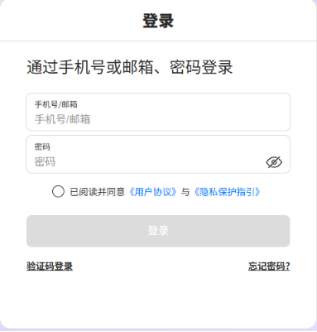
Open Browser: Enter the official login address
https://aihub.natec.cn/#/logininto the browser address bar and access it. - Account Password Login: Accurately enter your registered account and password in the corresponding input fields on the login page.
- Read and Agree to Terms: Carefully read the relevant terms and check the box labeled "I have read and agree to the 'User Agreement' and 'Privacy Protection Guidelines'".
- Log In to System: Click the blue "Login" button. The system will verify your identity; please wait patiently for the page to automatically redirect to the workbench.
3. Operational Workflow
The core operational workflow of this system is simple and intuitive, primarily consisting of four stages: inputting system information, uploading review documents, executing analysis, and viewing results. Please proceed according to the following guidelines:
3.1 Input Basic Information
Upon entering the function page, first fill in the name or type of the system to be audited in the designated area. This information will assist the system in more accurately matching the corresponding security compliance standards.
3.2 Upload Security Review Documents
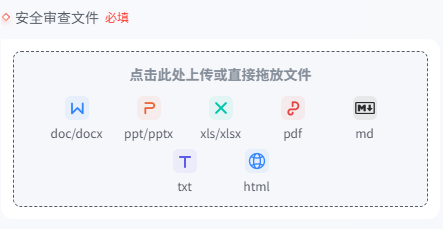
Click the file upload area or directly drag and drop files into the upload box. The system supports the following document formats:
- Document Types:
.doc,.docx - Presentation Types:
.ppt,.pptx - Spreadsheet Types:
.xls,.xlsx - Other Common Formats:
.pdf,.md,.txt,.html
Please ensure that uploaded files contain clear content and adhere to standard formatting to enable the system to accurately extract key information.
3.3 Execute Analysis
After the file upload is complete and the information is confirmed to be correct, click the "Run" button. The system will begin reading and analyzing the file, automatically performing compliance item matching and risk identification.
3.4 View and Process Results
Upon completion of the analysis, the page will display the generated standardized response results. You may perform the following operations on the results:
- Share: Generate a link to share with team members.
- Favorite: Save important reports to your favorites.
- Copy: Copy partial or all content to the clipboard.
- Download: Export the results as a local file for storage.
4. Frequently Asked Questions
If you encounter the following situations during usage, please refer to the corresponding solutions:
Q1: What should I do if the page freezes or the generation time is excessively long? A: If the page becomes unresponsive or the generation time exceeds expectations, we recommend reopening the page. The system possesses breakpoint resume and background processing capabilities; incomplete generation results will continue to be processed in the background. Once processing is complete, they will be synchronized to the history records, so there is no need to worry about data loss.
Q2: How can I know if a task has been completed? A: Upon task completion, the system will automatically send an email notification to your bound email address; please check your inbox accordingly. Additionally, you can view the task status in the system's "History Records".
Q3: Where can I view previously incomplete or completed analysis tasks? A: All generated tasks (including those queued, in progress, and completed) can be found in the system's History Records module. You may return to this page at any time to view progress or download reports.
5. Summary
The System Security Checklist Batch Response Agent significantly simplifies the tedious processes of security auditing and compliance checking through an integrated workflow. Users need only perform a few simple steps—logging in, uploading, and running—to obtain professional, standardized security review results.
During operation, if you encounter generation delays or page anomalies, please utilize the "Reopen Page" and "History Records" functions to ensure work continuity. This system aims to provide you with efficient and reliable security document generation services, facilitating the effective achievement of enterprise security and compliance objectives.