

User Manual for the Software Test Case Generation Agent
1. Product Overview
The Software Test Case Generation Agent is an automated efficiency tool specifically designed for research and development as well as testing teams. Based on advanced natural language processing technology, this system deeply analyzes various software specification requirement documents and automatically generates comprehensive test cases covering positive functional verification, boundary condition testing, and exception scenario coverage. Through this system, users can significantly shorten the test preparation cycle, address the pain points of time-consuming manual writing and incomplete coverage associated with traditional methods, thereby substantially improving software defect detection rates and quality assurance efficiency.

2. Preliminary Preparation and System Login
Before utilizing this system to generate test cases, please ensure your network environment is functioning correctly and that you have prepared the requirement documents for testing. The detailed steps for logging into the system are as follows:
-
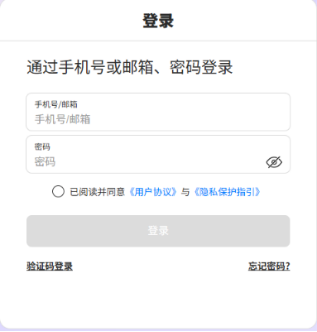
Open Browser: Enter the official login address in the address bar of your PC or mobile device browser:
https://aihub.natec.cn/#/login - Account and Password Login: Accurately enter your account username and password in the corresponding input fields on the login page.
- Confirm Agreement: Read the "User Agreement" and "Privacy Protection Guidelines." After confirming accuracy, check the box labeled "I have read and agree to the 'User Agreement' and 'Privacy Protection Guidelines'".
- Complete Login: Click the blue "Login" button. The system will verify your identity information. Upon successful verification, please wait briefly; the page will automatically redirect to the Workbench interface.
3. Operational Procedures
After logging into the Workbench, please follow the steps below to configure parameters and initiate the test case generation task.
3.1 Fill in Basic Configuration Information
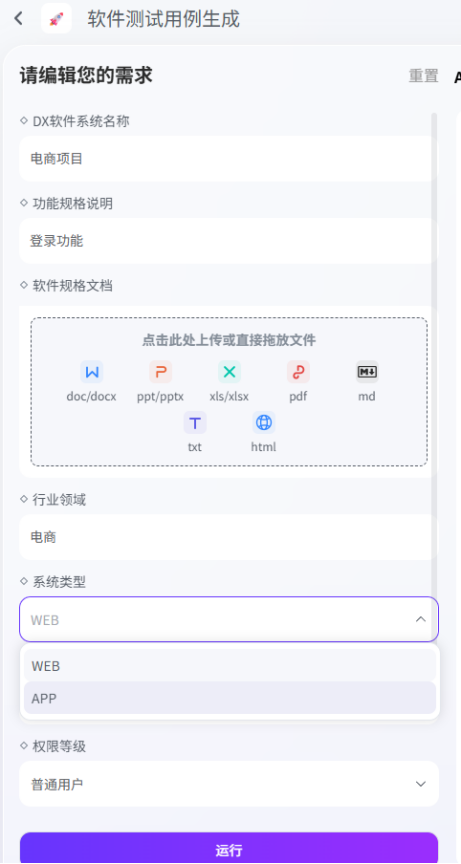
On the Task Creation page, please enter the following key information based on your actual business scenarios:
- Software System Name: Input the official name or project code of the system to be tested.
- Functional Specification Description: Briefly describe the core functions of the system or the key modules targeted for this test.
- Industry Domain: Input the specific industry to which this software belongs (e.g., Finance, E-commerce, Healthcare).
3.2 Upload Specification Documents
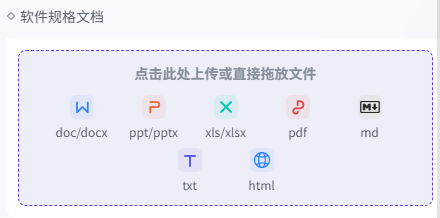
Click the upload area to upload your prepared requirement documents to the system. The system supports the following formats:
- Document Types: doc, docx, pdf, txt, md, html
- Presentation and Spreadsheet Types: ppt, pptx, xls, xlsx
3.3 Set Test Environment and Parameters
Based on your test plan, select or fill in the following technical parameters:
- System Type: Select from the dropdown menu (WEB / APP).
- Device Platform: Select the corresponding operating platform based on the system type (PC, Mobile, PAD).
- Permission Level: Select the user role to be simulated for this test (Regular User, Administrator, Super Administrator).
- Test Case Hierarchy Template: Enter or select a recommended organizational structure template for test cases.
- Key Coverage Types: Specify areas requiring enhanced testing, such as Security, Performance, etc.
3.4 Execution and Result Acquisition
- After confirming that all the above information is filled out correctly, click the "Run" button.
- The system will begin parsing the document and generating test cases.
- Upon completion, you can view the generated cases directly on the Results page. Operations such as Sharing, Favoriting, Copying, or Downloading results are supported.
Important Notes:
- If page freezing or error prompts occur during the generation process, it is recommended to reopen the page.
- If the generation time is prolonged, unfinished generation results will be automatically archived to the History upon completion; please check accordingly.
- Upon task completion, the system will send a notification via Email; please monitor your inbox.
4. Frequently Asked Questions
Q1: What should I do if there is no response after clicking "Run" following a document upload, or if the page loads too slowly? A: Please do not worry. This may be caused by network fluctuations or the large size of the document leading to extended parsing times. We recommend logging in again by reopening the page. Unfinished tasks will continue to be processed in the background; once completed, they will be saved in "History," and the system will send you an email notification.
Q2: Which format of requirement documents does the system support for upload? A: Currently, the system supports the following formats: doc, docx, ppt, pptx, xls, xlsx, pdf, md, txt, html. Please ensure your document format is included in this list.
Q3: How can I retrieve previously generated test cases? A: You can locate all past generation records, including details of completed tasks, within the "History" module of the Workbench.
Q4: After a generation task is completed, how else can results be saved besides viewing them online? A: The Results page offers multiple operational options. You can download files directly to your local device, use the copy function to paste content into other documents, or utilize the share function to send links to team members.
5. Summary
The Software Test Case Generation Agent greatly simplifies the tedious process of test design through intelligent document parsing and structured parameter configuration. Users only need to perform simple login, upload, and configuration operations to obtain high-quality test case sets. This system not only supports diverse document formats and detailed test scenario coverage but also ensures the continuity and convenience of task management through a robust history record and email notification mechanism, serving as a capable assistant for R&D and testing teams to enhance work efficiency.