

Employee Training Plan Drafting Agent User Manual
1. Product Overview
This product is an Employee Training Plan Drafting Agent specifically designed for corporate Human Resource managers and training leads. Its core function is to rapidly generate complete, detailed, and highly targeted employee training plans based on specific corporate talent development requirements.
The system automatically formulates comprehensive solutions encompassing training objectives, core content, training methodologies, and assessment criteria based on key information provided by the user. This tool aims to reduce the time costs associated with manual document creation, ensure the professionalism and systematic nature of training plans, and effectively support corporate talent development.
2. Preliminary Preparation and System Login
Before initiating the generation of a training plan, please ensure your network environment is functioning correctly and that you have prepared account credentials with the necessary access permissions. Please follow the steps below to log in to the system:
-
Open Browser
Enter the official login address into your computer browser's address bar:
https://aihub.natec.cn/#/login - Account and Password Login In the corresponding input fields on the login page, enter your system username and password.
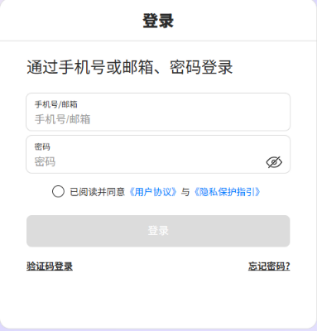
- Agree to Terms Below the login button, carefully review the relevant terms and check the box labeled "I have read and agree to the 'User Agreement' and 'Privacy Protection Guidelines'".
- Complete Login Click the blue "Login" button. The system will verify your identity; upon successful verification, you will be automatically redirected to the Workbench page.
3. Operational Workflow
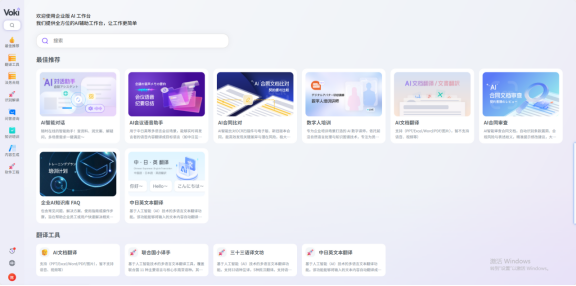
Upon successful login, you may access the "Employee Training Plan Drafting" functional module and follow the guidelines below to generate the plan document.
Step 1: Input Basic Training Information
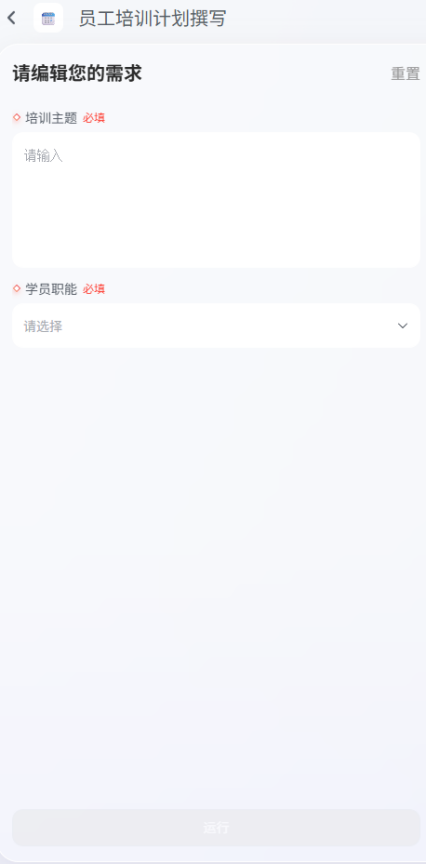
Locate this agent within the Workbench and enter the operation interface. You are required to fill in the following key parameters to customize the generated output:
- Enter Training Topic: Input the core theme of this training session into the designated text box (e.g., "2024 Annual Middle Management Leadership Enhancement", "Newly Hired Java Engineer Technical Specification Training").
-
Select Trainee Function: Based on the target audience, select the corresponding functional type from the dropdown menu:
- Management Role: Applicable to team leaders and department heads, focusing on management skills and strategic thinking.
- Technical Role: Applicable to R&D, engineering, and technical personnel, focusing on professional skills and practical operational capabilities.
Step 2: Generate Plan
After confirming that the input information is accurate, click the "Run" (or "Generate") button on the interface. The system will begin processing your request and will generate a detailed plan containing training objectives, content, methods, and assessments within seconds.
Step 3: View and Manage Results
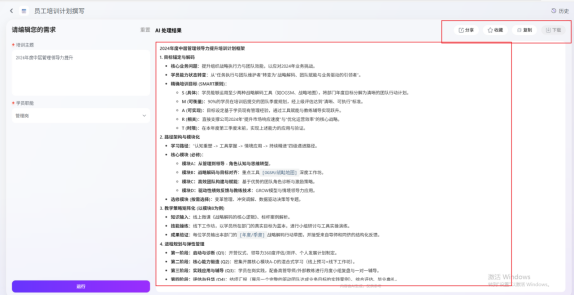
Once generation is complete, the results area will display the full training plan document. You may perform the following operations on the result:
- Copy: Copy the entire text content with one click for easy pasting into local documents for editing.
- Download: Export the result as a specific file format (such as PDF or Word) and save it locally.
- Share: Generate a sharing link to send to other colleagues for review.
- Favorite: Save the result to your personal favorites for convenient future reference.
⚠️ Important Notices and Exception Handling When utilizing the generation function, please note the following mechanisms:
- Excessive Generation Time or Lag: If you encounter slow page response or interruption during the generation process, you may attempt to refresh the page or re-open the functional page.
- Historical Record Traceability: As the system supports asynchronous background processing, unfinished generation results will automatically synchronize to your [History Records] once the system processing is complete, allowing you to retrieve and view them from the history list.
- Email Notification: Upon completion of the generation task, the system will send a notification email to your bound email address to ensure you do not miss the generated results.
4. Frequently Asked Questions
Q1: What should I do if the page remains unresponsive for an extended period after clicking "Run"? A: Please refrain from repeatedly clicking the button. You may try refreshing the browser page, or closing the current tab and re-entering after a short wait. The system will continue processing in the background; once completed, the result will be saved in [History Records], and an email notification will be sent to you.
Q2: Can the generated training plan be modified? A: The content generated by the system serves as a preliminary draft template. You may use the "Copy" function to paste the content into document editing software such as Word for personalized modification and adjustment.
Q3: Why have I not received the email notification? A: Please check your spam folder. Additionally, ensure that the email address bound during the login process is accurate. You may also log in directly to the system to view [History Records] to obtain the latest generated results.
5. Summary
This user manual provides a detailed explanation of the usage of the Employee Training Plan Drafting Agent, covering system login, entering key parameters (training topic, trainee function), and management operations after result generation (sharing, favoriting, downloading). By following the guidance in this manual, you can rapidly acquire high-quality drafts of training plans, significantly enhancing work efficiency. Should you encounter issues that the system cannot resolve during operation, it is recommended to contact the system administrator or the technical support team.