

AI Interviewer Agent User Manual
1. Product Overview
The AI Interviewer Agent is an intelligent assistance tool designed specifically for job seekers, aiming to address issues such as inadequate preparation and nervousness during interviews. By simulating realistic interview scenarios, the system intelligently generates targeted interview questions based on the user's designated target position and specific industry attributes.
Whether you are a novice participating in campus recruitment for the first time or a professional seeking career advancement, this tool helps you efficiently refine your interview skills and familiarize yourself with the interview process, thereby effectively improving your success rate in job hunting. The system incorporates various company types and position models, covering a wide range of business scenarios.
Key Features:
- Scenario-Based Simulation: Covers multiple enterprise types including IT, trade, manufacturing, and property management.
- Position Customization: Supports targeted questioning for dozens of specific positions across technical, managerial, and functional domains.
- Intelligent Interaction: Leveraging natural language processing to generate professional interview Q&A responses in real-time.
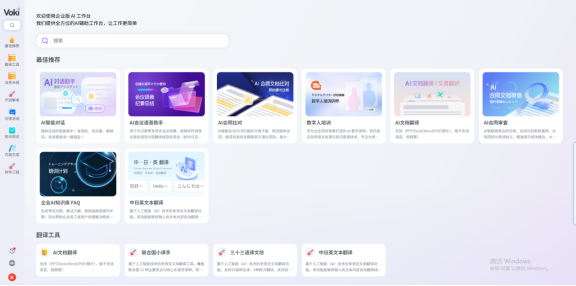
2. Preliminary Preparation and System Login
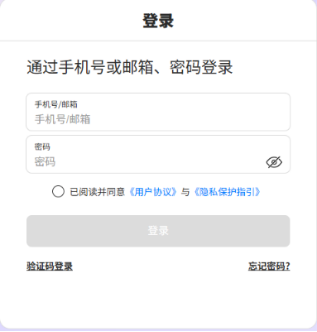
Prior to utilizing the AI Interviewer for simulated interviews, please ensure your network environment is stable and that you have prepared the account credentials assigned by the system. Please follow the steps below to log in:
- Open Browser: It is recommended to use modern browsers such as Chrome, Edge, or Firefox to ensure optimal compatibility.
-
Access Address: Enter the official login URL in the browser address bar:
https://aihub.natec.cn/#/login - Enter Credentials: Input your username and password into the corresponding fields on the login page.
- Confirm Agreement: Read and check the box labeled "I have read and agree to the 'User Agreement' and 'Privacy Protection Guidelines'".
- Complete Login: Click the blue "Login" button. The system will verify your identity; upon successful verification, please wait patiently for the page to automatically redirect to the workspace.
3. Operational Procedures
Upon successful login, you will enter the workspace interface. The following outlines the complete operational steps to initiate a simulated interview:
3.1 Select Interview Company Type
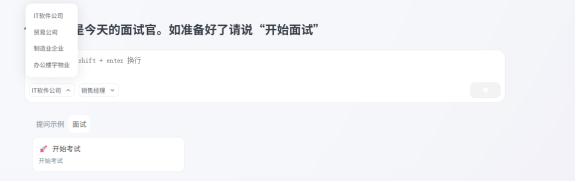
In the "Company Type" selection area, click the dropdown menu to select the industry to which your target enterprise belongs, according to your job application intentions. The options supported by the system include:
- IT Software Companies
- Trading Companies
- Manufacturing Enterprises
- Office Building Property Management
3.2 Select Interview Position
In the "Position Type" selection area, choose the specific position you intend to apply for. The system provides a comprehensive position library, including but not limited to:
- Management: Sales Manager, Software Project Manager, Finance Manager
- Functional: Administrative Specialist, HR Specialist, Software Product Manager
- Technical: JAVA Development Engineer, PHP Development Engineer, Python Development Engineer, Front-end Development Engineer, Software Test Engineer
3.3 Input Interview Questions
Enter the specific questions or scenario descriptions you wish to address in the text input field.
- Custom Input: Directly input business challenges or technical points of concern.
- Reference Examples: "Question Examples" are provided below the input field; you may click an example to quickly populate the content as a reference.
3.4 Submit and Generate Results
After confirming that the "Company Type," "Position," and "Input Question" are correct, click the "Submit" button. The system will immediately commence analysis and generate simulated interview answers or advisory guidance.
4. Frequently Asked Questions
If you encounter the following issues during usage, please refer to the corresponding solutions:
Q1: What should I do if the system prompts an error or the generation time is excessively long after clicking submit? A: Network fluctuations or high server load may cause response delays. It is recommended to reopen the page directly or refresh the browser. The system possesses a breakpoint resume mechanism; incomplete generation results will not be lost.
Q2: If the page was closed due to a timeout, can the previous generation results still be retrieved? A: Yes. Unfinished generation tasks will continue to be processed in the background. Upon completion, they will be automatically archived to your history records. You may access the "History Records" module within the system to retrieve the results.
Q3: How can I know when my interview questions have been fully generated? A: The system supports asynchronous notification mechanisms. Once the generation task is completed, the system will send a notification email to your registered email address; please monitor your inbox accordingly.
Q4: Is it mandatory to input questions in the text field? Can I directly use system presets? A: You may input questions independently according to your needs, or refer to the examples provided below the input field to formulate your inquiries.
5. Summary
The AI Interviewer Agent provides job seekers with an efficient and low-cost training ground through highly realistic interview scenarios and customized questioning strategies. Through simple operations involving login, configuration, and submission, users can obtain professional interview feedback. In the event of network fluctuations during usage, please utilize the History Records and email notification functions to recover results with confidence. We hope this tool assists you in overcoming interview challenges and successfully securing your desired offer.