AI Beauty Consultant Meow User Manual
1. Product Overview
AI Beauty Consultant Meow is an intelligent consultation system dedicated to enhancing users' psychological experience in their journey toward beauty through artificial intelligence technology. Beyond providing beauty advice based on documents or knowledge bases, the core positioning of this system is that of a user's "psychological companion." Through warm companionship, active empathy, and a unique "kitten-style" perspective, the system alleviates anxiety, loneliness, and feelings of insecurity for users as they pursue beauty.
This system transforms every interaction into a healing experience, allowing users to feel understood and supported while receiving professional beauty advice. Whether you have questions regarding skincare, makeup, or body management, AI Beauty Consultant Meow will provide the most considerate answers for you.

2. Preparation and System Login
Before using AI Beauty Consultant Meow, please ensure your network connection is stable and access the system using a recommended browser (such as Chrome or Edge). The specific steps for logging into the system are as follows:
-
Open Browser
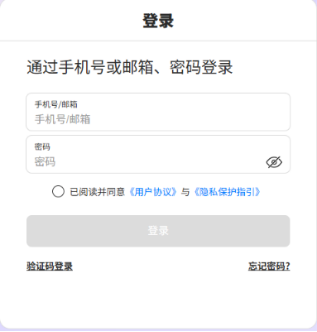
Enter the official login address
https://aihub.natec.cn/#/loginin the address bar of your computer browser and access it. - Account and Password Login In the designated input fields on the login page, enter the account and corresponding password assigned to you by the system.
- Confirm Agreement Please read the "User Agreement" and "Privacy Protection Guidelines." After confirming there are no errors, check the option below the input field stating "I have read and agree to the 'User Agreement' and 'Privacy Protection Guidelines'".
- Complete Login Click the blue "Login" button. The system will verify your identity. Upon successful verification, please wait patiently; the page will automatically redirect to the AI Beauty Consultant Meow workspace interface.
3. Operation Process
After logging into the system, you can interact with the AI beauty consultant and obtain consultation advice by following the process below. The entire operation is simple and intuitive, designed to provide you with a seamless user experience.
3.1 Select Beauty Consultant Role
The system provides beauty consultant roles with different styles for users to choose from, based on your current mood or the type of consultation required.
- Beauty Meow-chan: Focuses on general beauty, skincare, and makeup advice.
- Slim Meow-chan: Focuses on body management, healthy weight loss, and posture advice.
Click on your preferred role card to activate that consultant mode.

3.2 Submit Consultation Materials (Optional)
To receive more precise advice, you may choose to upload relevant files for reference.
- Locate the attachment or file upload icon in the input box area.
- Click the icon and select the local files you wish to submit (e.g., skin test reports, diet records, etc.).
- Once the file upload is successful, the system will display the corresponding file name or icon.
3.3 Input Questions and View Examples
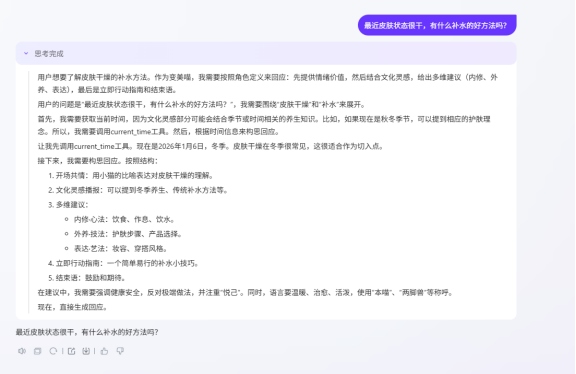
In the text input area of the dialogue box, please describe in detail the beauty problems you are encountering or the inner confusion you are experiencing.
- Direct Input: Type directly into the input box, for example, "My skin has been very dry recently; are there any good methods for hydration?"
- Reference Examples: Preset "Question Examples" are available below the input box. You can click these examples to quickly populate questions as a starting point for interaction.
3.4 Submit and Retrieve Results
After completing the above preparations, click the "Submit" or "Send" button next to the input box.
- The system will immediately generate a response. The AI consultant will answer your questions with a warm and empathetic tone, providing professional advice.
- You may continue multi-turn conversations within the same session window until your issues are resolved.
⚠️ Important Notice and Exception Handling
- System Anomalies or Timeouts: If the page freezes, displays an error, or if the generation time becomes excessively long during the result generation process, we recommend reopening the page**. Do not worry about data loss; unfinished generation results will continue to be processed in the background.
- Result Viewing and Notifications: Once an unfinished generation task is completed, the result will be automatically synchronized and saved in your history records. Simultaneously, the system will send an email notification** to you, reminding you that the consultation is complete; please check your inbox.
4. Frequently Asked Questions
Q1: What should I do if I suddenly lose internet connectivity or the page crashes during use? A: Please remain calm and simply reopen the browser to log back into the system. The system possesses resume capability; previous conversation records and tasks currently being generated will be preserved. Once generation is complete, you can view the results in your history records and will receive an email notification.
Q2: Can I choose different consultant roles for consultation? A: Yes. Every time you initiate a new conversation, you can freely switch between "Beauty Meow-chan" and "Slim Meow-chan" based on your specific needs (e.g., whether you wish to discuss makeup or weight loss).
Q3: Are there format or size restrictions on submitted files? A: To ensure the system can parse files quickly, please upload common document or image formats. If you encounter issues uploading due to a file being too large, we recommend compressing the file before trying again, or describing the key information directly in the input box.
Q4: Why is the reply speed sometimes slow? A: AI Beauty Consultant Meow requires some time for deep thinking when processing complex questions or analyzing uploaded files. If the waiting time is excessive, please refer to the instructions in the "Operation Process" section and reopen the page; the results will not be lost.
5. Summary
AI Beauty Consultant Meow is not merely a tool but a considerate partner on your journey to beauty. Through simple steps of logging in, selecting a role, uploading files (optional), and asking questions, you can receive advice that combines professionalism with emotional warmth.
We are committed to making every consultation a healing journey, helping you build confidence and achieve beauty effortlessly. Should you encounter any technical obstacles during use, please utilize the history record function and email notification mechanism to ensure you obtain complete consultation results.