

Advertising Law Compliance Review Agent User Manual
1. Product Overview
This system is an AI-powered agent designed for advertising law compliance detection, aiming to provide users with efficient and precise review services for advertising copy. The system identifies potential legal risks within advertising content, assisting users in avoiding pitfalls under the Advertising Law to ensure the legality and compliance of their advertisements. Through an intelligent analysis process, this product helps users establish a secure promotional defense line across various marketing scenarios.

2. Preliminary Preparation and System Login
Before utilizing the Advertising Law Compliance Review function, please ensure your device is connected to the internet and access the system using a recommended browser (such as Chrome or Edge). Please complete the login process by following these steps:
-
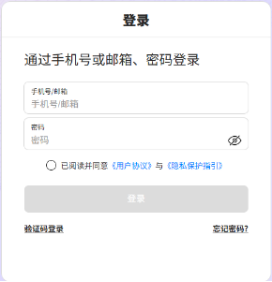
Open Browser: Enter the official login address in the browser's address bar:
https://aihub.natec.cn/#/login - Enter Account Information: Input your registered username and password into the corresponding fields on the login page.
- Read and Agree to Terms: Check the box for "I have read and agree to the 'User Agreement' and 'Privacy Protection Guidelines'".
Complete Login: Click the blue "Login" button. The system will verify your identity; please wait until you are automatically redirected to the dashboard.
3. Operational Procedures
Upon successful login, you may proceed with the compliance detection of advertising copy by following the steps below. The system supports the review of various copy types; please operate according to your specific business scenarios.
3.1 Select Copy Type
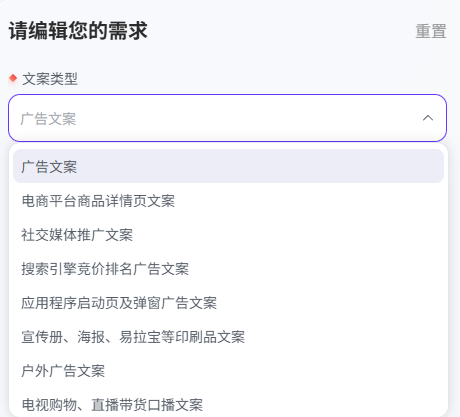
After entering the dashboard, you must first define the attributes of the copy to be detected. Please select the most appropriate option from the "Copy Type" dropdown menu. The system supports the following types:
-
Advertising Copy
-
E-commerce Platform Product Detail Page Copy
-
Social Media Promotion Copy
-
Search Engine Paid Ranking Ad Copy
-
Application Startup Page and Pop-up Ad Copy
-
Brochure, Poster, Roll-up Banner, and other Printed Material Copy
-
Outdoor Advertising Copy
-
TV Shopping and Live Streaming Broadcast Script Copy
-
Email Marketing Copy
-
SMS Marketing Copy
-
Product Packaging Copy
-
Official Website Brand Promotion and Product Introduction Copy
-
Commercial Video Narration Script
-
Advertising Campaign Planning Proposals and Related Promotional Materials
-
Brand Co-promotion Copy
-
Sales Promotion Copy
-
Public Relations News Releases and Soft Articles
-
Advertising Slogans and Brand Taglines
-
Endorser or Recommender-related Advertising Copy
3.2 Enter Advertising Copy Content
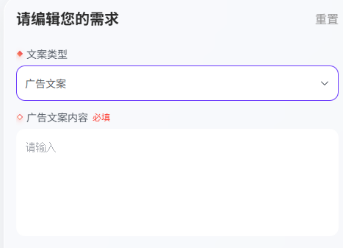
After selecting the type, please copy or input the complete advertising copy content you wish to detect into the designated text input field. Ensure the completeness of the content to obtain the most accurate review results.
3.3 Execute Detection and Retrieve Results
After confirming that the copy type selection is correct and the content is entered accurately, click the "Run" or "Generate Report" button. The system will initiate the AI intelligent analysis.
Important Notice:
- Generation Time: The system processes based on the length and complexity of the copy, which may require some time. Please be patient.
- Exception Handling: If page freezing, unresponsiveness, or excessive generation time occurs during the process, it is recommended that you close or reopen the page directly. The system backend will continue to process the task; incomplete generation results will be automatically synchronized to your "History Records" upon completion. Please rest assured.
- Result Notification: Upon completion of the detection task, the system will send a notification to your bound email address. Please check your mailbox promptly.
4. Frequently Asked Questions
Q1: The page froze after clicking generate; will my task be lost? A: No. The system possesses continuous backend processing capabilities. If the page freezes or generation takes too long, you may reopen the page. Once incomplete tasks are finished, the results will be saved in your "History Records" for viewing.
Q2: How do I know when the compliance report has been generated? A: Upon completion, the system will automatically send a notification email to your registered email address. Additionally, you may log back into the system and check the task status in the "History Records" list.
Q3: Will selecting the wrong copy type affect the results? A: Yes, it will. Different copy types correspond to distinct Advertising Law review rules and judgment criteria (e.g., compliance requirements for medical advertising differ from those for general commodity advertising). To ensure result accuracy, please务必 select the copy type that best matches your actual scenario.
5. Summary
The Advertising Law Compliance Review Agent provides a one-stop service ranging from copy type selection to AI intelligent detection through a systematic operational workflow. By following the procedures outlined in this manual, you can rapidly identify compliance risk points within advertising content. Please closely monitor system history records and email notifications to ensure no compliance report is missed, thereby guaranteeing that your advertising content is launched and published safely and in full compliance.