

User Manual for the Intelligent Product Copy Expansion Agent
1. Product Overview
This product is an intelligent system for expanding product promotional copy, built upon advanced artificial intelligence technology. Its core function is to automatically generate rich, highly attractive, and persuasive promotional content based on the basic product information and key selling points provided by the user. This system is designed to assist marketing personnel, content creators, and product managers in rapidly producing high-quality marketing text, significantly enhancing content production efficiency and communication effectiveness.
By deeply understanding brand tone and user needs, this system transforms dry product descriptions into vivid and powerful marketing language, ensuring that the generated copy aligns with business logic while effectively reaching potential customers.
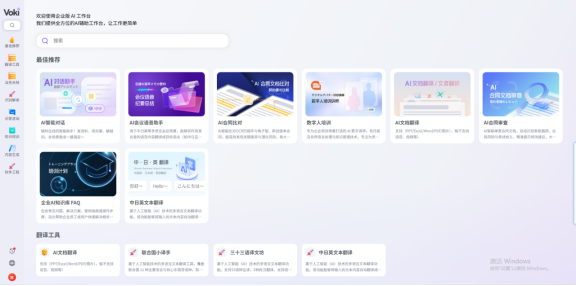
2. Preliminary Preparation and System Login
Before utilizing this system for copy expansion, please ensure you possess a valid system account and that your local network environment is stable. Please follow the steps below to complete the login process:
-
Open the Browser
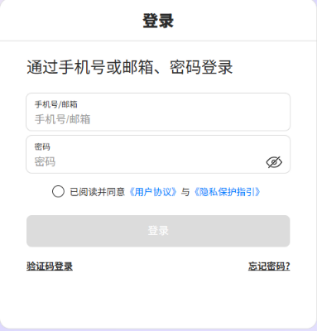
Launch your preferred web browser (such as Chrome, Edge, Firefox, etc.) on your computer device. Enter the official login address
https://aihub.natec.cn/#/loginin the address bar and press Enter to access the page. - Enter Account Credentials In the designated area on the login page, accurately input the username and corresponding password used during your registration. Please pay attention to the full-width/half-width state of your input method to ensure accuracy.
- Agree to Terms Locate the checkbox labeled "I have read and agree to the 'User Agreement' and 'Privacy Protection Guidelines'" below the login button, and click to check it, confirming your agreement.
- Complete Login Click the blue "Login" button. The system will verify your identity credentials. Upon successful verification, please wait briefly; the page will automatically redirect to the system workspace.
3. Operational Procedures
Upon successful login, enter the workspace to begin using the copy expansion functionality. Please adhere to the following steps:
3.1 Fill in Basic Copy Information
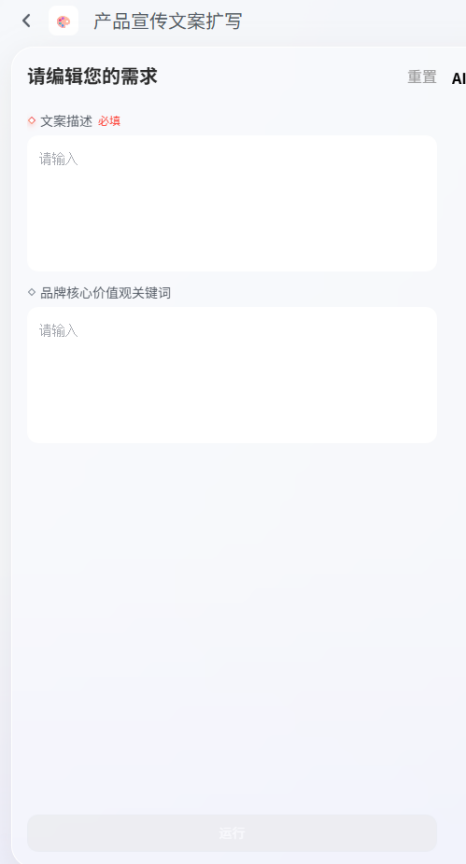
In the primary input area of the system interface, locate the text box designated for copy expansion. Here, you must input the original product copy or selling point description intended for expansion.
- Operational Guidance: Please strive to provide clear and accurate base text, as this directly impacts the quality of the expansion results.
3.2 Fill in Brand Core Values (Optional)
Below the basic copy input box, locate the section titled "Brand Core Value Keywords." This field is optional.
- Operational Guidance: If you desire the expanded copy to better align with a specific brand tone (e.g., "Eco-friendly," "High-tech," "Luxury"), please enter relevant keywords in this field. If left blank, the system will perform expansion based on general marketing logic.
3.3 Generation and Waiting
After confirming that the input is correct, click the "Generate" or "Start Expansion" button. The system will commence processing your request.
-
Generation Time and Exception Handling:
- The copy generation process requires a certain amount of computational time, the duration of which depends on the complexity of the text.
- Exception Handling: If you encounter page freezing or excessive generation times during operation, it is recommended that you attempt to reopen the page or refresh the browser.
- Result Preservation: Rest assured, incomplete generation results will continue to be processed in the background. Once generation is complete, the system will automatically save the results to your History Records, allowing you to review them at any time subsequently.
3.4 Result Notification
Upon completion of the copy expansion task, the system will send a notification email to your registered email address informing you that the task has been finished. You may then directly click the link in the email or view the results within the system's History Records.
4. Frequently Asked Questions
Q1: After clicking "Generate," the page continues to load with a spinning icon for an extended period. What should I do? A: This may be caused by network fluctuations or high server concurrency. It is recommended that you re-open the page or refresh the browser. Your task has not been lost; the system will continue processing it in the background. Once generation is complete, the results will be stored in your History Records, and you will be notified via email.
Q2: Will leaving the "Brand Core Value Keywords" field blank affect the generation? A: No, it will not. This field is optional. If left blank, the system will expand the copy based on a general marketing model. If filled, the system will attempt to integrate the style of the keywords into the copy, making it more consistent with your brand tone.
Q3: How can I find previously generated copy? A: All completed tasks (whether retrieved after refreshing the page or normally completed) are saved in the system's "History Records" module. After logging into the system, click on "History Records" in the navigation bar to view and download them.
5. Summary
The Promotional Copy Expansion Agent is an efficient and reliable marketing assistant. By simply logging in, filling in the copy, and optionally providing brand keywords, users can quickly obtain high-quality promotional content. The system features a robust exception handling mechanism and history record functionality, ensuring that user work is not lost even in the event of network fluctuations. Combined with the email notification feature, users can easily manage every generation task, achieving efficient production of product promotion content.