

Copywriting Enhancement System User Manual
1. Product Overview
This product is a professional Copywriting Enhancement intelligent tool designed to assist users in improving the quality and dissemination effectiveness of textual content. By performing in-depth language optimization, style adjustment, and rhetorical refinement on existing copy, the system effectively enhances readability and emotional impact, thereby strengthening brand communication capabilities. This system is suitable for scenarios requiring professional upgrades of marketing texts, public announcements, or daily communication content, ensuring precise output language and fluent expression.

2. Preliminary Preparation and System Login
Before utilizing the copywriting enhancement function, please ensure your device is connected to the internet and access the system using a recommended modern browser (such as Chrome, Edge, etc.). The detailed login steps are as follows:
-
Open Browser
Enter the official login address in the browser's address bar:
https://aihub.natec.cn/#/login - Account and Password Login Accurately enter your account credentials and password in the designated input fields on the login interface.
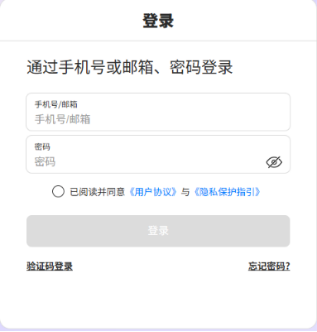
- Confirm Agreement Below the login button, you must check the box labeled "I have read and agree to the 'User Agreement' and 'Privacy Protection Guidelines'" to confirm your compliance with the platform's usage regulations.
- Complete Login Click the blue "Login" button; the system will verify your identity information. Upon successful verification, the page will automatically redirect to the workspace.
3. Operational Procedures
After entering the workspace, you may proceed with the following steps to enhance your copy. Please note that users must provide the copy content to be enhanced to initiate a task.
- Input Copy Content In the text input area of the operation interface, enter or paste the original copy you wish to optimize. Ensure the input text is clear and complete to enable the system to accurately understand the context.

- Initiate Enhancement Task Once the content is confirmed to be error-free, click the "Run" or "Start Enhancement" button. The system will immediately commence intelligent analysis and restructuring of the copy.
- Retrieve Results and Status Notifications Upon completion of processing, the system will display the enhanced copy results directly on the interface. During this process, please note the following special circumstances:
- Generation Time and Exception Handling: If generation takes an excessive amount of time or the page becomes unresponsive, you may attempt to close and reopen the page**. Rest assured, unfinished generation tasks will continue running in the background.
- Result Inquiry: Once generation is complete, results will be displayed instantly on the current interface; if you closed the page before generation was finished, you may also locate subsequent completed results within the History Records.
- Notification Service: Upon completion of task processing, the system will send a notification via email** to ensure you do not miss the processing results.

4. Frequently Asked Questions
Q1: What should I do if the system remains in "Processing" status after clicking "Run"? A: Please avoid repeatedly clicking the button. You may attempt to close the current tab and then reopen the page to access the system. The system will continue to complete the previous task in the background, and the results will be automatically saved to your History Records upon completion.
Q2: How can I determine whether my copy has been processed? A: We provide a dual-notification mechanism. First, results can be viewed directly once the page loads completely; second, the system will automatically send a notification email to your registered email address upon completion of the generation task. Please monitor your inbox accordingly.
Q3: Why is it mandatory to input copy to run the system? A: The core function of this system is to optimize existing text; it cannot create content ex nihilo. When the input field is empty, the system lacks an object for processing and therefore cannot initiate a task.
5. Summary
The Copywriting Enhancement System provides efficient and precise copy optimization services to users through intelligent language processing technology. By adhering to the guidance in this manual, you can effortlessly complete the entire process from login, input, and execution to result retrieval. Should you encounter prolonged waiting periods or page anomalies during operation, please flexibly utilize the History Records and email notification features to ensure the acquisition of your high-quality copywriting deliverables.