

AI Knowledge Search System User Manual
1. Product Overview
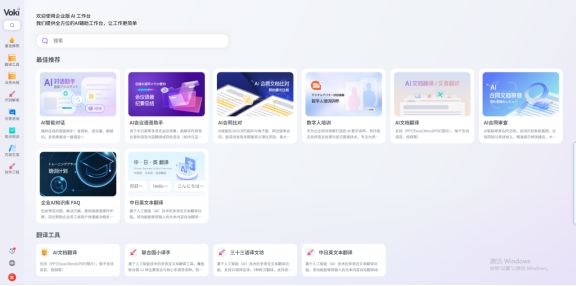
This product is a professional AI Knowledge Search Agent, designed to leverage advanced AI technologies to provide precise retrieval services for knowledge bases. The system focuses on rapidly acquiring domain-specific knowledge, offering in-depth informational support in response to user inquiries, and effectively assisting various consultation scenarios.
The system covers multiple core business domains, including but not limited to:
- Practical AI Applications
- Efficient AI Excel Techniques
- Digital Transformation
- Training Digital Avatars
Through intelligent semantic understanding and retrieval capabilities, the system transforms complex information requirements into intuitive and accurate answers, helping users enhance work efficiency and decision-making quality.
2. Preliminary Preparation and System Login
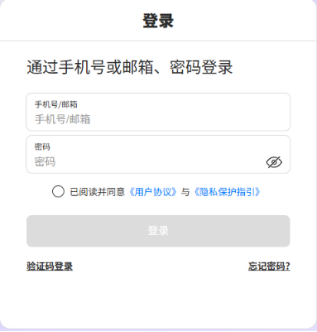
Before utilizing the AI Knowledge Search functionality, please ensure your device is connected to the internet and access the system using a recommended browser (such as Chrome or Edge). Follow the steps below to log in to the system:
-
Open Browser: Launch your web browser and enter the official login address in the address bar:
https://aihub.natec.cn/#/login - Enter Account Information: In the corresponding input fields on the login page, enter your known username and password.
- Confirm Agreement: Carefully read the relevant terms and check the box labeled "I have read and agree to the 'User Agreement' and 'Privacy Protection Guidelines'".
- Execute Login: Click the blue "Login" button. The system will verify your identity; please wait patiently for the page to automatically redirect to the Workbench interface.
3. Operational Procedures
Upon successful login, you will enter the Workbench. Follow the steps below to complete AI knowledge searches and retrieve results:
3.1 Select Knowledge Category
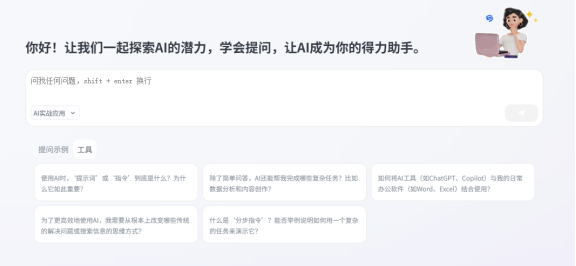
Based on your consultation needs, first click to select the corresponding category tag within the system interface.
- Available Categories: Practical AI Applications, Efficient AI Excel Techniques, Digital Transformation, Training Digital Avatars.

3.2 Input Question
In the input field provided by the system, clearly and accurately enter the question you wish to consult. If you are unsure how to formulate your query, refer to the example questions provided below the input field for assistance.
3.3 Submit and Retrieve Results
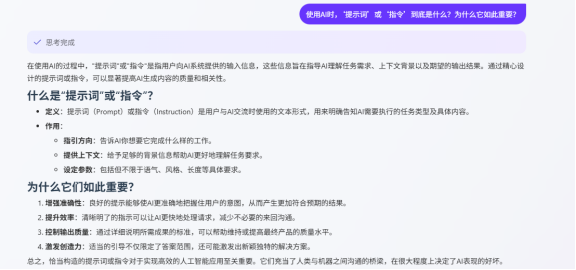
After confirming the question is correct, click the "Submit" button. The system will immediately begin processing your request and generate retrieval results within the interface.
Important Notice:
- Extended Generation Time or Page Freezing: If the page becomes unresponsive or generation takes an unusually long time during the process, please attempt to reopen the page.
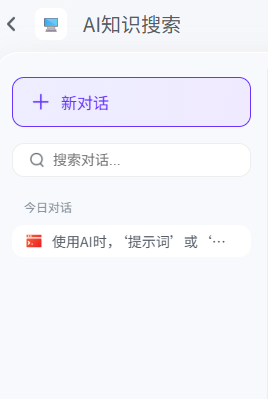
- Viewing History: For generation tasks that were interrupted before completion, the system will continue processing them in the background. Once completed, results will be automatically synchronized and saved to your History; you may log in at any time to view them.
- Result Notification: Upon completion of the generation task, the system will send a notification email to your registered email address; please pay attention to your inbox.
4. Frequently Asked Questions
Q1: After clicking Submit, the page keeps spinning with no response. What should I do? A: This may be caused by network fluctuations or system congestion. We recommend refreshing the browser or reopening the page directly. Unfinished tasks will continue to be processed in the background, so there is no need to worry about data loss.
Q2: If I accidentally close the page, will my previous search results still be available? A: Yes. As long as the task was submitted successfully, the system will complete the generation in the background even if the page is closed. Once finished, the results will be saved in your "History," and you will receive an email notification.
Q3: How can I know when my question has been processed? A: The system supports two methods for notification: First, monitor your registered email account, where you will receive a completion notification email; Second, log in to the system to check the "History" list, where the status of completed tasks will be updated.
5. Summary
The AI Knowledge Search System provides users with an efficient and precise platform for acquiring professional knowledge through structured categorization and intelligent retrieval technology. During usage, please adhere to the guidance in this manual for logging in and operating the system, and make rational use of the "History" and email notification features to ensure an optimal user experience. In case of any anomalies, please refer to the troubleshooting tips provided in the Frequently Asked Questions section.