

User Manual for Contract Interpretation Agent
1. Product Overview
This software system is a professional Contract Interpretation Agent, designed to transform expert knowledge in commercial contract drafting and risk control into intelligent services. The core function of the system lies in the in-depth analysis of legal clauses, converting complex and obscure legal terminology into clear, accurate, and unambiguous written expressions.
Based on the contract drafting requirements submitted by users, this system not only assists in generating complete templates with comprehensive clauses and precise language but also emphasizes the intelligent review and interpretation of existing contract documents. Through systematic analysis, the system helps users quickly identify potential risks, clarify the rights and obligations of all parties, thereby enhancing the efficiency and accuracy of contract processing.
2. Preliminary Preparation and System Login
Before using the Contract Interpretation Agent, please ensure that your device is connected to the Internet and access the system using a recommended browser (such as Chrome, Edge, etc.). The specific steps to log in are as follows:
-
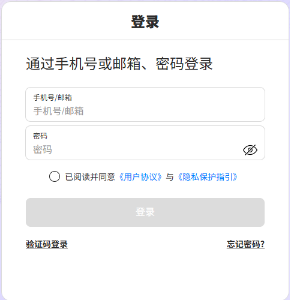
Open Browser: Enter the official login address in the browser address bar:
https://aihub.natec.cn/#/loginand access it. - Enter Credentials: On the login page, enter your registered username and password.
- Confirm Agreement: Read and check the box next to "I have read and agree to the 'User Agreement' and 'Privacy Protection Guidelines'".
- Complete Login: Click the blue "Login" button and wait for the page to redirect to the system workspace.
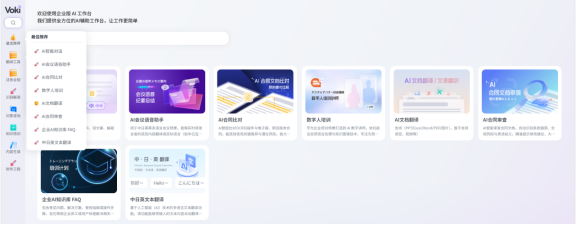
Upon entering the workspace, you will see the system's functional navigation and operation area. The interface design is concise and professional, facilitating the rapid location of required functions.
3. Operational Procedures
This chapter provides detailed instructions on the complete process from uploading documents to obtaining interpretation results. Please proceed step-by-step according to the following guidelines:
3.1 Uploading Contract Documents
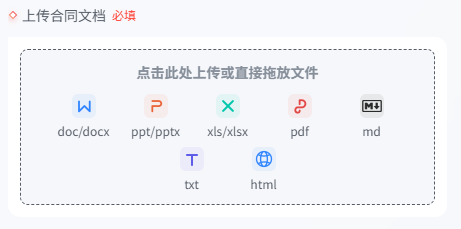
After entering the operation page, the first step is to upload the contract file to be interpreted. The system supports multiple mainstream document formats to ensure compatibility. Please verify that your file format meets the following requirements:
- Supported Formats: doc, docx, ppt, pptx, xls, xlsx, pdf, md, txt, html.
Click the upload area, select the local file, and proceed with the upload.
3.2 Configuring Interpretation Parameters
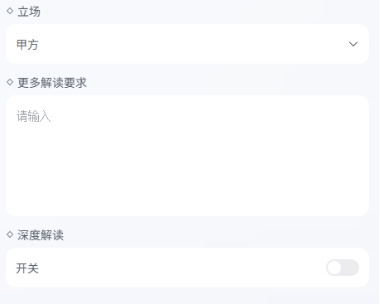
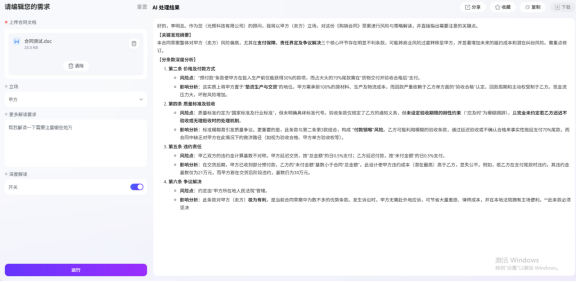
Upon completion of the upload, the system will display the parameter configuration panel. You may adjust the following settings based on actual business needs:
- Select Stance: The system defaults to "Party A". If you represent the interests of Party B, please manually switch the setting to "Party B".
- Additional Interpretation Requirements: This field is optional. If you have specific points of concern or special directions for interpretation (e.g., focusing on payment terms, liability for breach of contract, etc.), please enter the specific requirements in the text box.
- Enable Deep Interpretation: The default setting is "Off". If the contract content is extremely complex or requires more detailed legal analysis, you may manually enable this switch.
3.3 Execution and Result Retrieval
Once the document upload is confirmed correct and parameters are set, click the "Run" button. The system will commence intelligent analysis and processing of the contract.
3.4 Extended Functions
After successful result generation, users can share, bookmark, copy, and download the results.

Important Notes:
- The processing procedure may require some time; please wait patiently.
- In the event of page freezing or excessively long generation times, you may attempt to re-open the page. The system possesses breakpoint resume capabilities; incomplete generation results will continue to be processed in the background.
- Upon task completion, the system will send a notification via email.
- You may also view and retrieve previously unfinished or completed interpretation results within the system's History Records.
4. Frequently Asked Questions
Q1: What contract file formats does the system support? A: The system supports various common document formats including doc, docx, ppt, pptx, xls, xlsx, pdf, md, txt, and html.
Q2: What should I do if the page freezes or becomes unresponsive during interpretation? A: This may be caused by network fluctuations or an oversized file. You may close the current tab and re-open the system page. Unfinished tasks will continue to run in the background, and upon completion, the results will be saved in "History Records" for your review, eliminating the need to re-upload.
Q3: How can I know when the contract interpretation is complete? A: The system supports email notifications. Once the interpretation is complete, the system will automatically send a notification email to your bound email address. Alternatively, you may directly check the task status in the "History Records" list within the system.
Q4: Under what circumstances should the "Deep Interpretation" feature be enabled? A: The default state satisfies most routine interpretation requirements. If you are handling commercial contracts with extremely complex clauses, or if you require deeper and more meticulous risk point mining, it is recommended to manually enable the "Deep Interpretation" feature.
Q5: What is the default analytical stance of the system? A: The default stance of the system is "Party A". If you represent Party B, please ensure you switch the stance to "Party B" in the settings after uploading the file to guarantee the accuracy of the interpretation perspective.
5. Summary
The Contract Interpretation Agent combines legal expertise with intelligent technology to provide users with an efficient and precise contract analysis tool. Guided by this manual, you can easily complete the entire process from system login, document upload, and parameter configuration to result retrieval.
Please make rational use of the "Stance Selection," "Additional Requirements," and "Deep Interpretation" features to obtain interpretation results that best align with your business needs. Should any anomalies occur during operation, please refer to the solutions provided in the Frequently Asked Questions section, and utilize the History Records and email notification features to ensure no processing results are lost.