

AI Fortune Master: User Manual
1. Product Overview
The AI Fortune Master is an intelligent consultation system deeply integrating the wisdom of traditional Chinese numerology. Based on classic texts such as Bazi (Four Pillars of Destiny), Zi Wei Dou Shu, Yuan Hai Zi Ping, San Ming Tong Hui, and Di Tian Sui, this system leverages advanced artificial intelligence technology to provide users with professional and precise numerological analysis services.
The system aims to lower the barriers to traditional numerological consultation, enabling users to conveniently access personalized fortune interpretations. Whether you are seeking career guidance, emotional counseling, or insights into your life's destiny, the AI Fortune Master provides in-depth analytical support.
Core Feature Highlights:
- Multi-Role Advisors: Offers two distinct advisor personas, "Master Miao" and "Xuan Ji Zi," catering to diverse user consultation preferences.
- Integration of Classic Theories: Incorporates multiple core systems of traditional numerology to ensure the professionalism and authority of the analysis.
- Multimodal Interaction: Supports text-based inquiries and file uploads, adapting to various consultation scenarios.
- Intelligent Asynchronous Processing: Features a robust task queue and notification mechanism to ensure the reliable delivery of complex analysis tasks.
2. Preliminary Preparation and System Login
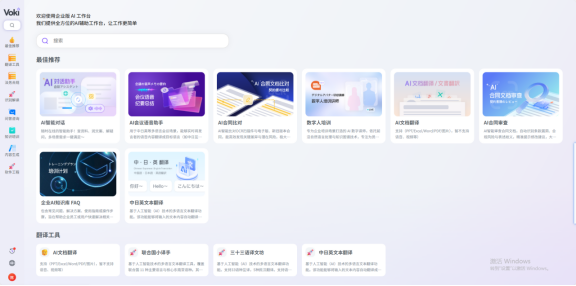
Before initiating consultations with the AI Fortune Master, please ensure your device is connected to the internet and access the system using a recommended browser (e.g., Chrome, Edge). Please follow the steps below to complete the login process:
2.1 Access the Login Page
Open your web browser and enter the official login address in the address bar:
https://aihub.natec.cn/#/login
2.2 Enter Account Information
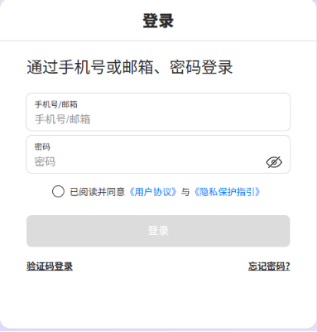
In the login form displayed on the page, accurately input your registered username and password.
2.3 Confirm Agreements
Read the "User Agreement" and "Privacy Protection Guidelines." Upon confirming their accuracy, check the box labeled "I have read and agree to the 'User Agreement' and 'Privacy Protection Guidelines'".
2.4 Log In to the System
Click the blue "Login" button. The system will verify your identity credentials. Upon successful verification, you will be automatically redirected to the dashboard interface.
3. Operational Procedures
This chapter guides you through selecting an advisor, submitting materials, and obtaining numerological analysis results via the system.
3.1 Select Advisor Role
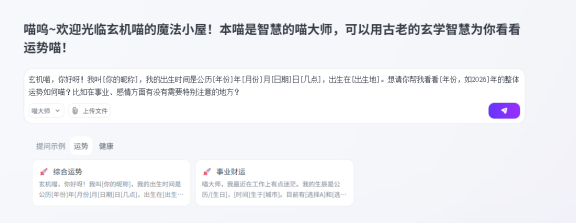
Upon entering the consultation interface, the system presents available advisor roles. Please select based on your preference:
- Master Miao: A friendly and lively style, suitable for users seeking relaxed and easy-to-understand interpretations.
- Xuan Ji Zi: A rigorous and profound style, suitable for users pursuing professional depth and classical methodology analysis.
3.2 Submit Files (Optional)
Based on your consultation needs, you may choose to upload relevant files (e.g., birth information sheets, specific data files).
- Click the "Upload File" or "Add Attachment" area.
- Select the required file from your local device.
- Once the system displays a successful upload confirmation, proceed to the next step.
3.3 Input Inquiry
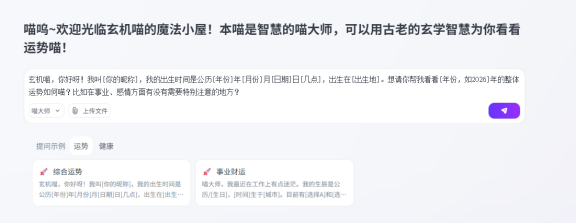
In the input field located at the center of the interface, enter your consultation question in detail. To obtain more precise interpretations, it is recommended that the question description be clear and specific.
- Reference Examples: Question examples are typically provided below the input field. You can click on these examples to quickly populate the field or refer to their phrasing.
3.4 Obtain Results
After clicking the "Submit" button, the system will begin processing your request.
- Real-time Feedback: For certain simple inquiries, the analysis results will be displayed directly on the current page.
- Asynchronous Notification: For complex numerological calculations, processing time may be extended. Upon completion, the system will notify you via email. Unfinished generated results will be saved in the "History Records," where they can be accessed at any time.
> [Note] System Stability Notice If you encounter page freezing, unresponsiveness, or excessive generation times during operation, it is recommended to close the current page and reopen it. Please do not resubmit identical requests. Uncompleted generation tasks will continue to run in the background. Upon completion, the system will send an email notification, and the final result can also be found in the History Records.
4. Frequently Asked Questions
Q1: What should I do if the page keeps loading after clicking submit? A: Do not refresh the page frequently. Since numerological calculations involve complex algorithms, they may require some time. You may close the page and later view the results through the system's History Records or wait for the email notification.
Q2: How do I know when my analysis is complete? A: The system features an automatic notification function. Once the generation task is completed, a completion notice will be sent to your registered email address. Additionally, you can view the full report in the "History Records" module upon logging into the system.
Q3: Are there format requirements for uploaded files? A: Please refer to the format instructions indicated on the upload interface. It is recommended to upload clear images or common document formats (e.g., PDF, Word) to ensure the system can accurately recognize the information.
Q4: Will the analysis results differ between the two advisor roles? A: Both "Master Miao" and "Xuan Ji Zi" are based on the same core logic of traditional numerology; however, their interpretation styles, focal points, and linguistic expressions will vary. Users may select based on personal preference.
5. Summary
By combining traditional numerological wisdom with modern AI technology, the AI Fortune Master provides users with an efficient and convenient platform for fortune analysis. Through simple steps including logging in, selecting an advisor, inputting questions, and uploading files, users can obtain professional guidance.
During usage, if you encounter situations where task generation takes an extended period, please utilize the system's History Records and email notification functions with confidence to avoid repetitive operations. We are committed to providing you with the highest quality intelligent numerological service experience.