

User Manual for the Contract Drafting Agent
1. Product Overview
The Contract Drafting Agent is an intelligent document generation tool specifically designed for legal practitioners, corporate legal departments, and business professionals. The core function of this system is to automatically generate contract templates with complete structures, comprehensive clauses, and precise language based on user-defined drafting requirements.
The system supports multi-language output (Simplified Chinese, English, Japanese) and multi-party stance switching (Party A/Party B), enabling flexible handling of various business scenarios. By inputting specific business backgrounds, service contents, and commercial terms, combined with reference documents uploaded by the user, the system can rapidly transform inputs into professional legal documents. This significantly reduces the time cost of contract drafting while ensuring the standardization and rigor of the documentation.
2. Preliminary Preparation and System Login
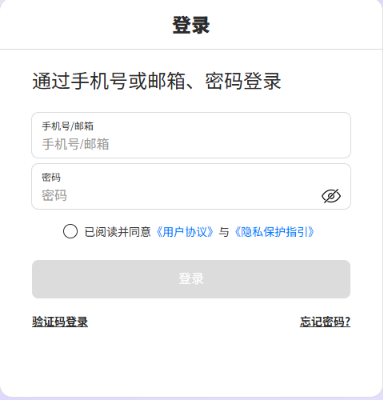
Before using the Contract Drafting Agent, please ensure your device is connected to the internet and access the system via a modern browser (such as Chrome, Edge, Firefox, etc.). The specific steps for logging in are as follows:
-
Open Browser: Enter the official login address in the browser's address bar:
https://aihub.natec.cn/#/login - Account and Password Login: In the input fields on the login page, enter your registered account and password respectively.
- Read Agreements: Check the checkbox at the bottom of the page stating "I have read and agree to the 'User Agreement' and 'Privacy Protection Guidelines'".
- Complete Login: Click the blue "Login" button and wait for the page to automatically redirect to the system workspace.
3. Operational Workflow
After logging into the system, enter the Contract Drafting Workspace. Please follow the instructions below to generate contract documents that meet your requirements.
3.1 Fill in Drafting Information
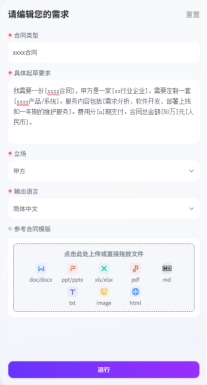
Accurately filling out the following mandatory fields in the contract drafting form is key to generating high-quality contracts:
- Contract Type: Clearly specify the type of contract required, such as "Software Development Contract," "Procurement Contract," or "Service Agreement."
-
Specific Drafting Requirements: Provide a detailed description of the business background, subject matter, and core clauses.
-
Example Content: I require a
[xxxx Contract]. Party A is a[xx Industry Enterprise]requiring the customization of a set of[xxxx Product/System]. Service content includes[Requirement Analysis, Software Development, Deployment, and One-Year Maintenance Services]. Payment shall be made in[n]installments. The total contract amount is[500,000][RMB].
-
Example Content: I require a
- Stance Selection: Select "Party A" or "Party B" based on your actual role.
- Output Language: Select the final language for the contract text; options include Simplified Chinese, English, and Japanese.
3.2 Upload Reference Contracts (Optional)
If you have reference templates, you may click the upload area to submit them.
- Supported Formats: doc/docx, ppt/pptx, xls/xlsx, pdf, md, image.
- The system will analyze the structure and style of the reference template to assist in generating documents that better align with your preferences.
3.3 Execute Generation
After confirming that the above information is correct, click the "Run" or "Generate" button. The system will begin processing your request.
3.4 Result Retrieval and Exception Handling
As contract generation involves complex logical reasoning, it may take some time. Please note the following matters during this period:
- Generation Notification: Upon completion of the generation task, the system will send a notification email to your registered email address. Please check your inbox.
- History Records: If network fluctuations or page lag occur during the generation process, resulting in an excessively long response time, it is recommended to re-open the page. Unfinished generation results will continue to be processed in the background. Once completed, they will be automatically archived in "History Records," where you can download them at any time.
- Result Viewing: You can view the generated preview directly on the current page or download the document for secondary editing.
4. Frequently Asked Questions
Q1: What should I do if the page crashes during generation? A: There is no need to worry; the system possesses breakpoint resume capabilities. Simply re-open the browser to access the system and log in. Navigate to the "History Records" page, where the system will display the task status. Once generation is complete, you can retrieve the contract document there.
Q2: Does the system support image formats for reference templates?
A: Yes. The system supports uploading reference files in image format (such as JPG, PNG, etc.). The system will utilize OCR technology to extract the text structure from these images for reference.
Q3: How can the legal validity of the generated contract be ensured? A: This system aims to provide contract drafts with complete structures and precise language. The generated documents are for reference and drafting assistance only. It is recommended that the documents be reviewed by qualified legal professionals in accordance with specific laws and regulations prior to use.
Q4: Can I use the system to generate contracts in foreign languages? A: Yes. In the "Output Language" option, you may select Simplified Chinese, English, or Japanese. The system will generate contract clauses in your selected language.
5. Summary
Through structured input guidance and an intelligent generation engine, the Contract Drafting Agent transforms the cumbersome task of contract writing into a simple four-step process (Fill Information, Upload Template, Run, Retrieve Results). Whether dealing with complex project development contracts or routine service procurement agreements, this system provides powerful assistance. Adhering to the operational guidelines in this manual and making effective use of the History Records and email notification features will ensure a smooth and efficient user experience.