

User Manual for Recruitment JD Writing Agent
1. Product Overview
This product is an intelligent document generation tool specifically designed for corporate HR professionals and recruiters. Its core function is to utilize artificial intelligence technology to accurately generate Job Descriptions (JDs) containing essential elements such as job responsibilities and qualification requirements, based on user-inputted position needs. This system aims to address common pain points in traditional writing processes, including time consumption, non-standard formatting, and imprecise language, thereby helping enterprises efficiently publish recruitment information and rapidly attract suitable talent.
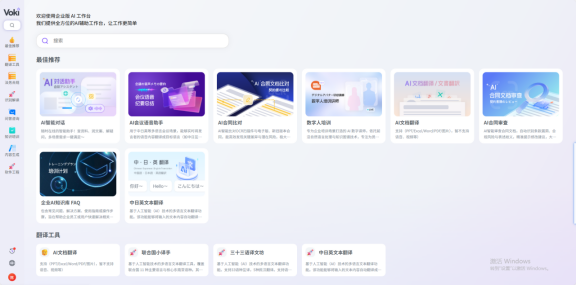
2. Preliminary Preparation and System Login
Before using this system to draft a JD, please ensure you possess valid account credentials and complete the following login steps:
-
Open Browser
Enter the official login address into the address bar of your computer browser (modern browsers such as Chrome or Edge are recommended):
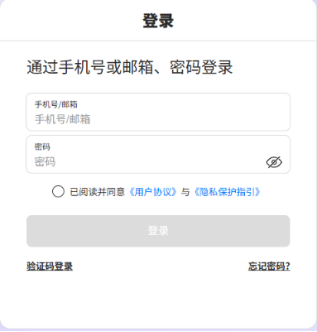
https://aihub.natec.cn/#/login - Account and Password Login Accurately input your system username and password into the corresponding fields on the login page.
- Agreement Confirmation Check the box next to "I have read and agree to the 'User Agreement' and 'Privacy Protection Guidelines'". Please be sure to review the relevant terms to understand your rights and obligations.
- Complete Login Click the blue "Login" button. Please wait patiently for the system to redirect until you enter the Workbench interface.
3. Operational Workflow
The core operational workflow of this system is simple and intuitive; users only need to provide basic position information to generate high-quality JDs.
3.1 Information Entry
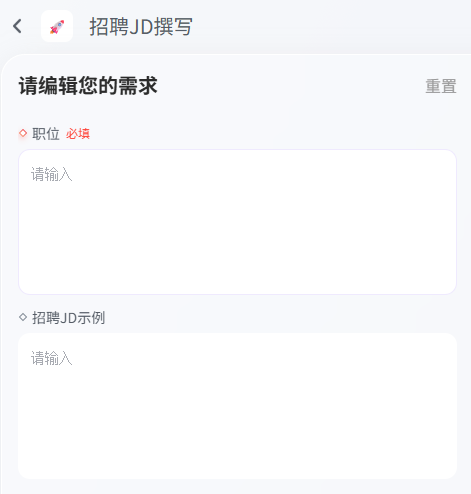
After entering the Recruitment JD Writing function page, please proceed according to the following instructions:
- Fill in Position (Required) In the "Job Title" or "Position Name" input field, enter the specific position you intend to recruit, such as "Senior Java Engineer" or "Product Manager". This information serves as the core basis for system generation.
- Fill in Recruitment JD Example (Optional) If you wish for the generated JD style to align more closely with your company's historical recruitment practices, you may paste a historical recruitment JD for this position or a similar position into the "JD Example" text box as a reference. If no specific style is required, this step may be skipped.
3.2 Generation and Result Retrieval
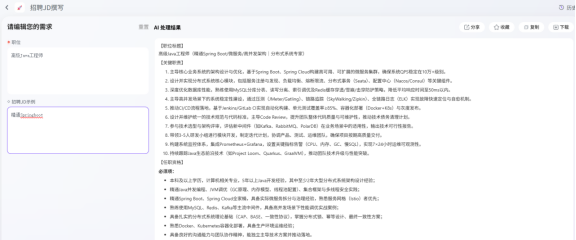
- Submit for Generation After confirming that the information is correct, click the "Generate" or "Start Drafting" button. The system will begin processing your request.
- Exception Handling and Timeout Management
- System Notification: If you encounter page freezing, error messages, or excessive generation time during the process, please attempt to reopen the page.
- Data Security: The system features a breakpoint resume mechanism. Incomplete generation results will not be lost; the system will continue processing in the background. Upon task completion, results will automatically synchronize to your History Records, where you can access them at any time.
- Receive Notification To ensure you receive results promptly, the system will send a notification email via the email address bound during registration once the JD generation is complete. Please check your inbox accordingly.
4. Frequently Asked Questions
Q1: After clicking Generate, the page keeps spinning with no response. What should I do? A: This may be caused by network fluctuations or high server load. We recommend refreshing the current page or closing and reopening the system directly. There is no need to worry; the system will retain your task status. Once completed, you will be notified via email, and you can also retrieve the result from the "History Records."
Q2: If I accidentally close the browser window, will the JD currently being generated be lost? A: It will not be lost. As long as you have successfully submitted the generation request, the system will continue processing in the background. You can log back into the system later and view the generation results in the "History Records" section.
Q3: Why have I not received the email notification indicating generation completion? A: Please first check your Spam/Junk mail folder. If you confirm it has not been received, it may be due to email settings or system delays. We recommend logging directly into the system to check the "History Records," as results are typically updated in the system immediately.
Q4: Must the "Recruitment JD Example" filled in be exactly consistent with the position? A: No, it is not mandatory. The JD example provided is primarily intended to allow the system to learn your linguistic style and formatting preferences. Therefore, filling in examples from similar positions or the same department will also effectively optimize the generation outcome.
5. Summary
This agent provides professional, structurally complete recruitment JDs through a minimalist operational workflow—requiring only the entry of core position information (and optional reference examples). The system incorporates robust exception handling mechanisms (such as page refresh retries) and result notification mechanisms (history record synchronization and email notifications), ensuring data security and a smooth user experience. By utilizing this tool, enterprises can significantly reduce the cost of drafting recruitment copy and improve the efficiency and quality of talent acquisition.