

IT Technical Support Consultation System User Manual
1. Product Overview
This system is a professional AI agent for IT technical support consultation, designed to provide users with rapid and accurate responses to technical issues within the IT domain. The system deeply integrates large language model technology with a specialized knowledge base, covering a wide range of areas including but not limited to computer hardware maintenance, operating system troubleshooting, software development consulting, and the configuration and optimization of various cloud services (Alibaba Cloud, Azure, AWS). Through an intelligent interactive interface, users can quickly identify the root cause of problems and obtain solutions, thereby significantly improving the efficiency of technical fault resolution.
This manual aims to guide users on how to log in to the system, efficiently initiate consultations, retrieve results, and handle potential exceptions.
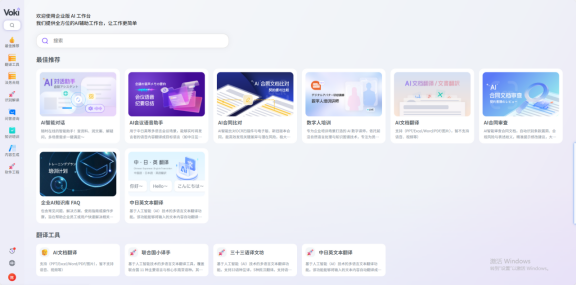
2. Preliminary Preparation and System Login
Before utilizing the AI technical support consultation feature, please ensure your network connection is stable and you are using a supported browser (Chrome or Edge browsers are recommended for the optimal experience).
2.1 Access and Login
Please follow the steps below to log in to the system:
-
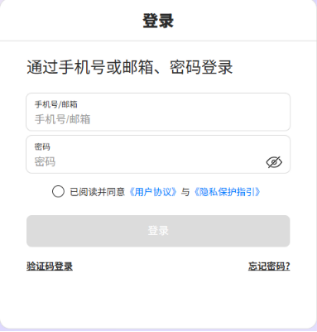
Open Browser: Enter the official login address in the address bar:
https://aihub.natec.cn/#/login - Enter Credentials: In the corresponding input fields on the login page, enter your username and password respectively.
- Confirm Agreement: Read and check the box stating "I have read and agree to the 'User Agreement' and 'Privacy Protection Guidelines'".
- Complete Login: Click the blue "Login" button. The system will verify your identity; please wait patiently for the page to automatically redirect to the workspace.
3. Operational Workflow
Upon successful login, you may begin using the AI technical support consultation feature. The following outlines the complete workflow for submitting inquiries and obtaining answers.
3.1 Select Consultation Category
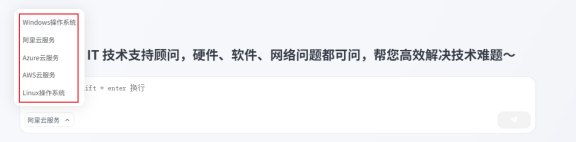
The system supports multiple categories across various technical domains. To obtain more precise answers, please first select from the following categories based on the nature of your issue:
- Windows Operating System
- Alibaba Cloud Services
- Azure Cloud Services
- AWS Cloud Services
- Linux Operating System
3.2 Input Technical Issue
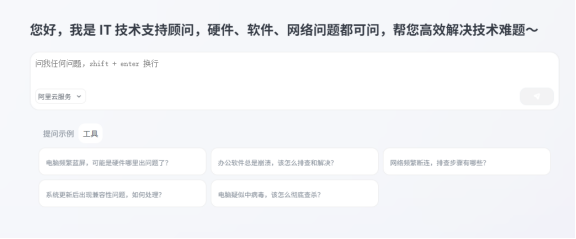
- In the text input field on the page, describe the technical malfunction or inquiry you are encountering in detail. It is recommended that you provide specific error codes, error messages, or operational contexts to facilitate better understanding by the AI.
- Reference Question Examples: Preset question examples are provided below the input field. If you are unsure how to phrase your question, you may click on or refer to the format of these examples for input.
3.3 Submit and Retrieve Results
- Click the "Submit" button (or the send icon); the system will commence processing your inquiry.
- Wait for the system to generate the analysis result. The answer will be displayed directly within the current conversation window.
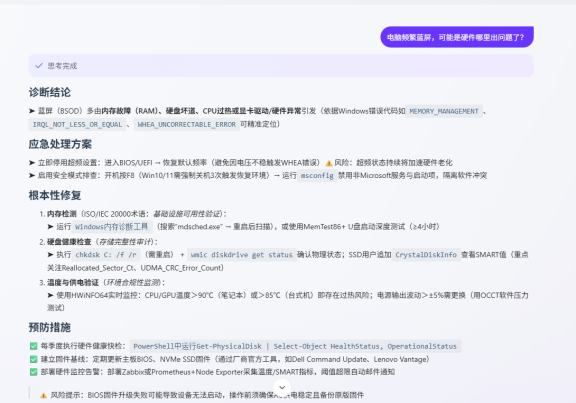
3.4 Exception Handling and Result Tracking
In the event of the following situations during usage, please refer to the corresponding guidelines:
- Page Freezing or Unresponsiveness: If the page freezes or generation takes an excessive amount of time during the inquiry process, it is recommended that you directly re-open the page or refresh the browser.
-
Incomplete Generation Results: If results fail to fully display on the current page due to network fluctuations or other reasons, do not resubmit the same issue. The system will continue processing in the background. Upon completion:
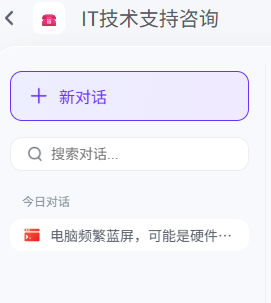
- The result will be automatically synchronized and saved to your History.
- You will receive an email notification from the system informing you that the solution has been generated, allowing you to view it at any time.
4. Frequently Asked Questions
Q1: What should I do if my issue does not fall under the five categories listed by the system? A: Currently, the system is optimized primarily for Windows, Linux, and cloud services from Alibaba Cloud, Azure, and AWS. We recommend attempting to rephrase your question to align with the closest available category, or selecting the "General" category (if available), though the accuracy of the answer may vary.
Q2: After submitting an issue, the system continuously displays "Generating"; what should I do? A: First, please check your network connection. If the network is stable but the waiting time is excessive, it is recommended to refresh the page. The system supports breakpoint resumption; you may check the processing progress in the background tasks or history section. Upon completion, the system will send an email notification.
Q3: How can I view previous consultation records? A: After logging into the system, locate the "History" or "Conversation Records" module within the workspace interface and click to view past inquiries and the corresponding solutions generated by the system.
Q4: What content is included in the received email notification? A: The email notification serves to alert you that the task is complete. The content typically includes a brief summary of the issue and a link to jump directly to the system to view the full details.
5. Summary
The AI Technical Support Consultation System is a capable assistant for resolving IT technical challenges. By simply selecting a category, inputting your issue, and submitting, you can obtain professional solutions. Please feel free to use the system; even in cases where generation is interrupted due to network instability, the system's comprehensive history recording and email notification mechanisms ensure that no important solution results are missed. Should you encounter persistent system access issues, please contact the administrator.