

Agent Requirements and R&D Assistant User Manual
1. Product Overview
This product is an intelligent assistant system positioned as the bridge between requirements and research & development, designed to establish a precise link from user intent to engineering implementation. As an efficient knowledge converter, the system deeply deconstructs colloquial requirement descriptions and transforms complex functional logic into clear, easy-to-understand structured content. Through this system, users need not concern themselves with underlying implementation details; by simply inputting business requirements, they can rapidly obtain professional, standardized R&D-level documentation.
This system is committed to enhancing the accuracy and efficiency of requirement conversion, shortening communication pathways, and ensuring that business objectives are precisely understood and executed by technical teams.
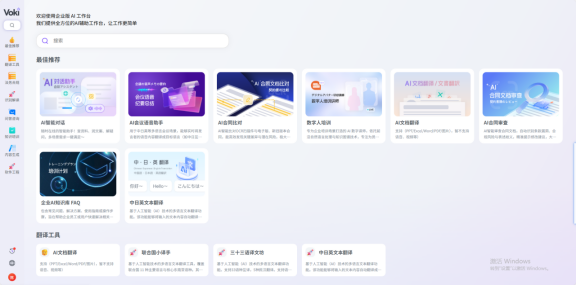
2. Preliminary Preparation and System Login
Before commencing the use of the system for requirement conversion, please ensure your network environment is functioning normally and that you have valid account credentials prepared. The following outlines the standard operating procedure for logging into the system:
2.1 Accessing the System
- Launch a mainstream browser (Chrome or Edge is recommended for optimal experience).
- Enter the official login address in the address bar:
https://aihub.natec.cn/#/loginand access the page.
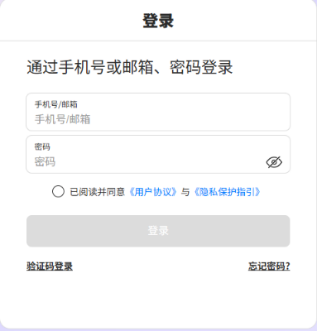
2.2 Account Login
- Enter Credentials: In the corresponding input fields on the login page, enter your username and password.
- Review Agreements: Please read the relevant terms carefully and check the box stating "I have read and agree to the 'User Agreement' and 'Privacy Protection Guidelines'".
- Execute Login: Click the blue "Login" button.
- Enter Workspace: Upon successful verification of the information, the system will automatically redirect to the workspace interface, at which point you may begin utilizing all available features.
3. Operational Workflow
The core operational workflow of this system is designed to be concise and efficient, primarily covering three stages: requirement input, intelligent generation, and result retrieval and management.
3.1 Input Requirement Description
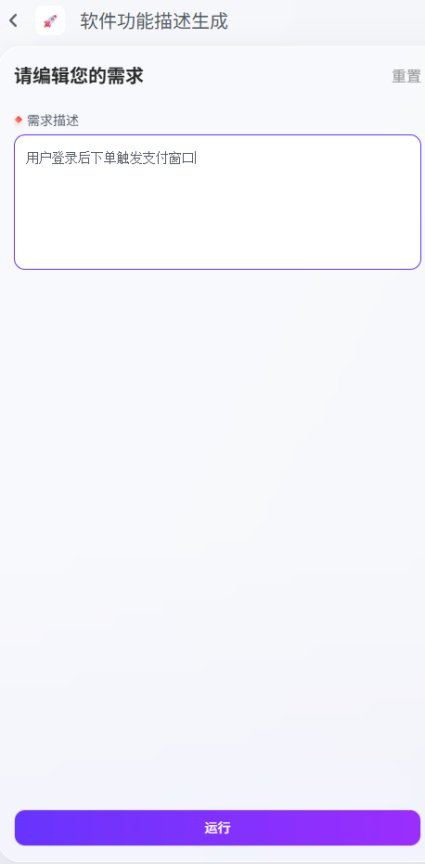
- In the functional area of the workspace, locate the requirement input field.
- Enter the colloquial or unstructured requirement description you wish to convert. You may input business scenarios, functional point descriptions, or specific logical requirements.
- After confirming the input information is correct, click the "Run" button.
3.2 Wait for Generation and Exception Handling
- After clicking "Run", the system will commence intelligent parsing and structured generation.
- Please remain on the current page and wait patiently for the processing results.
-
Handling Exceptions:
- If issues arise during the generation process, or if the generation time exceeds expectations, it is recommended that you close and reopen the page.
- Rest assured that incomplete generation tasks will not be lost. The system will continue processing in the background; upon completion, the results will be automatically saved to your "History Records", where they may be viewed at any time.
3.3 View and Manage Results
Once the system has completed the generation, you may perform various operations on the results:
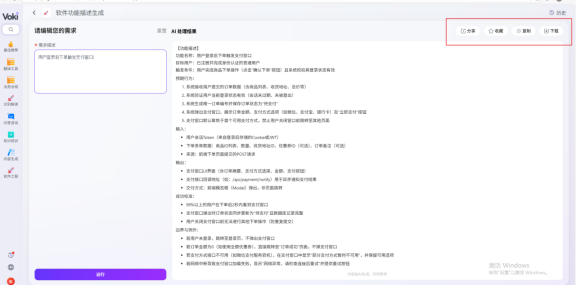
- View Results: Examine the converted structured content in the page display area.
-
Result Operations: Based on your subsequent needs, manage the generated results through the following actions:
- Share: Generate a link to share with team members.
- Favorite: Save important results to your personal list.
- Copy: Copy the content to the clipboard with a single click.
- Download: Download the results as a local file.
- Receive Notifications: Upon completion of the generation task, the system will send a notification via email, ensuring you do not miss the results even if you have left the page.
4. Frequently Asked Questions
Q1: What should I do if the page remains loading after clicking "Run"? A: This may be caused by network fluctuations or server congestion. It is recommended that you close the current tab and log into the system again. Your task will continue to be processed in the background; once completed, the results will be saved in "History Records", and an email notification will be sent to you.
Q2: How can I retrieve previously generated documents? A: The system features an automatic recording function. After logging in, you can locate all records of past completed generation tasks, including both downloaded and undownloaded documents, within the "History Records" module.
Q3: How will I be notified when generation is complete? A: By default, the system will send a notification email to your registered email address upon completion of the task. Please monitor your inbox (including the spam folder) to receive the results promptly.
Q4: What formats are supported for exporting the generated results? A: You may save the results locally by clicking the "Download" button on the interface. The specific supported formats are subject to the options actually provided on the interface (typically including common document formats).
5. Summary
Through a streamlined interaction process, this agent system significantly lowers the threshold for converting requirements into R&D documentation. Users need only complete the three steps of "Login - Input - Run" to obtain high-quality structured content. Comprehensive history records, email notifications, and multi-format result management functions ensure that users can stably and efficiently access work deliverables under any circumstances. By utilizing this system, you will be able to substantially improve the accuracy of requirement communication and the efficiency of R&D coordination.