

User Manual for the Training Learning Material Generation System
1. Product Overview
This system is an intelligent content generation tool specifically designed for corporate training. Based on industry standards and job requirements, it intelligently integrates key knowledge points, case studies, and exercises to automatically generate precise, structured, and easy-to-understand training materials. The system supports the customization of multi-level learning paths, aiming to ensure the practicality and evaluability of content, thereby significantly enhancing organizational learning effectiveness.
Through simple interface operations, users can input training topics, types, and application scenarios to obtain high-quality materials encompassing both theory and practice. Furthermore, the system supports the upload of reference materials in various formats, ensuring that the generated content aligns closely with specific business needs.
2. Preliminary Preparation and System Login
Before using this system to generate training materials, please ensure you possess a valid account and follow the steps below to log in.
2.1 Accessing the System
- Open a mainstream web browser (Chrome, Edge, or Safari are recommended).
- Enter the official login address in the address bar:
https://aihub.natec.cn/#/loginand press Enter to access.
2.2 Account Login
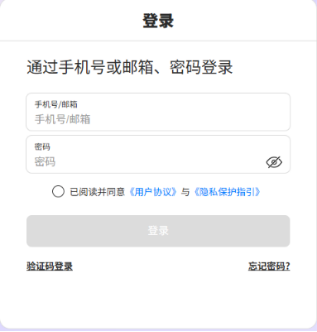
- In the corresponding input fields on the login page, enter your Account and Password.
- Check the box below stating "I have read and agree to the 'User Agreement' and 'Privacy Protection Guidelines'".
- Click the blue "Login" button.
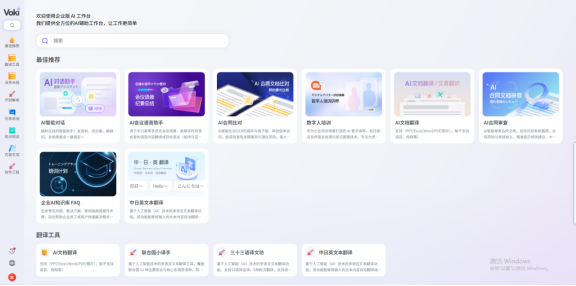
- Upon successful verification of information, the system will automatically redirect you to the system dashboard.
3. Operational Procedures
This chapter provides detailed guidance on how to create and obtain a complete set of training materials from scratch.
3.1 Filling in Generation Requirements
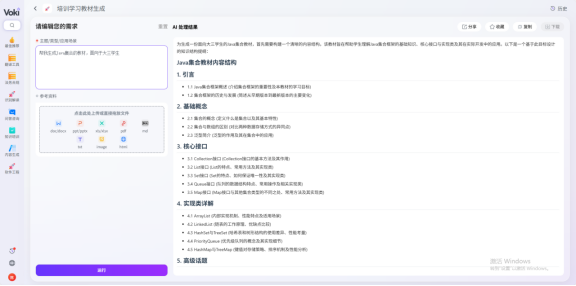
After logging into the dashboard, locate the area for creating new tasks. Users need to clearly define the basic framework of the training materials:
- Topic: Enter the core title or key knowledge point of the training material (e.g., "New Employee Onboarding Communication Skills").
- Type: Select the category of the material (e.g., Skills Training, Compliance Management, Leadership Development, etc.).
- Application Scenario: Describe the specific usage environment for the material (e.g., Offline Workshop, Online Self-study Course, Pre-job Coaching, etc.).
\
3.2 Uploading Reference Materials (Optional)
To enhance the relevance and richness of the training materials, you may upload relevant background documents. The system supports the following file formats:
- Documents:
.doc,.docx,.pdf,.md,.txt - Presentations:
.ppt,.pptx - Data Files:
.xls,.xlsx - Web Pages and Images:
.html,.image
Please drag files into the upload area or click "Select File" to upload them.
3.3 Submitting for Generation and Retrieving Results
- After confirming that all information is correctly filled and reference materials (if any) are uploaded, click the "Submit" button.
- The system will begin intelligent analysis and generation. If the generation process takes a considerable amount of time, you may safely close the current page.
- Result Notification and Viewing:
- Upon completion, the system will notify you via email.
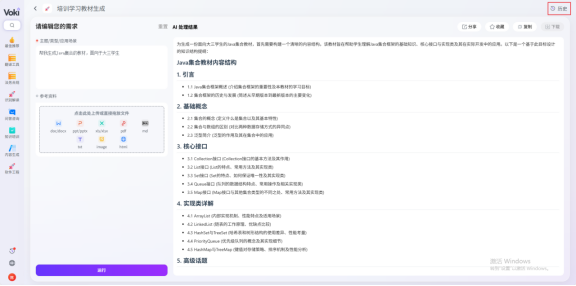
- You may also reopen the system page at any time, navigate to "History", and view the results of pending or completed tasks.
3.4 Result Management and Operations
Within the History section or detail pages, you can view the complete content of the generated training materials. For generated results, the system provides the following convenient operations:
- Download: Save the training material to your local device.
- Copy: Copy the text content for secondary editing.
- Share: Generate a shareable link to send to other collaborators.
- Favorite: Add high-quality training materials to your favorites for quick access.

4. Frequently Asked Questions
Q1: What should I do if the page freezes or displays an error during generation? A: Please attempt to refresh the browser page or reopen the system link. There is no need to worry about losing progress; the system will continue processing in the background. Once generation is complete, the result will be automatically saved in your "History", and an email notification will be sent.
Q2: Why is my uploaded file not being recognized? A: Please verify that the file format is within the supported list (doc/docx, ppt/pptx, xls/xlsx, pdf, md, txt, image, html) and that the file is not corrupted. If issues persist, please try converting the format and uploading again.
Q3: How can I locate previously generated training materials? A: After logging into the system, click on "History" in the navigation bar. You will be able to view the status and result lists of all generation tasks.
5. Summary
This system transforms the tedious task of writing training materials into a simple "Input-Generate" workflow through intelligent means. Users only need to provide the core topic and reference materials to obtain professional, structured corporate training materials. From logging in, filling out requirements, uploading documents, to retrieving results, every step has been meticulously designed to ensure efficiency and convenience.
During usage, please make full use of the History function and result sharing features to maximize team collaboration efficiency. In the event of special circumstances such as excessively long generation times, please refer to the guidelines in the Frequently Asked Questions section to ensure data security and task completion.